Mar 26, 2011

The little boy

Sally jumped up as soon as she saw the surgeon come out of the operating room. She said: “How is my little boy? Is he going to be all right? When can I see him?”
The surgeon said, “I’m sorry. We did all we could, but your boy didn’t make it.”
Sally said, “Why do little children get cancer? Doesn’t God care any more? Where were you, God, when my son needed you?”
The surgeon asked, “Would you like some time alone with your son? One of the nurses will be out in a few minutes, before he’s transported to the university.”
Sally asked the nurse to stay with her while she said good-bye to son. She ran her fingers lovingly through his thick red curly hair.
“Would you like a lock of his hair?” the nurse asked.
Sally nodded yes. The nurse cut a lock of the boy’s hair, put it in a plastic bag and handed it to Sally. The mother said, “It was Jimmy’s idea to donate his body to the university for study. He said it might help somebody else. “I said no at first, but Jimmy said, ‘Mom, I won’t be using it after I die. Maybe it will help some other little boy spend one more day with his Mom.” She went on, “My Jimmy had a heart of gold. Always thinking of someone else. Always wanting to help others if he could.”
Sally walked out of Children’s mercy Hospital for the last time, after spending most of the last six months there. She put the bag with Jimmy’s belongings on the seat beside her in the car. The drive home was difficult. It was even harder to enter the empty house. She carried Jimmy’s belongings, and the plastic bag with the lock of his hair to her son’s room. She started placing the model cars and other personal things back in his room exactly where he had always kept them. She laid down across his bed and, hugging his pillow, cried herself to sleep.
It was around midnight when Sally awoke. Laying beside her on the bed was a folded letter. The letter said:
“Dear Mom, I know you’re going to miss me; but don’t think that I will ever forget you, or stop loving you, just ’cause I’m not around to say I LOVE YOU. I will always love you, Mom, even more with each day. Someday we will see each other again. Until then, if you want to adopt a little boy so you won’t be so lonely, that’s okay with me. He can have my room and old stuff to play with. But, if you decide to get a girl instead, she probably wouldn’t like the same things us boys do. You’ll have to buy her dolls and stuff girls like, you know. Don’t be sad thinking about me. This really is a neat place. Grandma and Grandpa met me as soon as I got here and showed me around some, but it will take a long time to see everything. The angels are so cool. I love to watch them fly. And, you know what? Jesus doesn’t look like any of his pictures. Yet, when I saw Him, I knew it was Him. Jesus himself took me to see GOD! And guess what, Mom? I got to sit on God’s knee and talk to Him, like I was somebody important. That’s when I told Him that I wanted to write you a letter, to tell you good-bye and everything. But I already knew that wasn’t allowed. Well, you know what Mom? God handed me some paper and His own personal pen to write you this letter. I think Gabriel is the name of the angel who is going to drop this letter off to you. God said for me to give you the answer to one of the questions you asked Him ‘Where was He when I needed him?’ “God said He was in the same place with me, as when His son Jesus was on the cross. He was right there, as He always is with all His children.
Oh, by the way, Mom, no one else can see what I’ve written except you. To everyone else this is just a blank piece of paper. Isn’t that cool? I have to give God His pen back now. He needs it to write some more names in the Book of Life. Tonight I get to sit at the table with Jesus for supper. I’m, sure the food will be great.
Oh, I almost forgot to tell you. I don’t hurt anymore. The cancer is all gone. I’m glad because I couldn’t stand that pain anymore and God couldn’t stand to see me hurt so much, either. That’s when He sent The Angel of Mercy to come get me. The Angel said I was a Special Delivery! How about that?.. (Source )

Helpless love

Once upon a time all feelings and emotions went to a coastal island for a vacation. According to their nature, each was having a good time. Suddenly, a warning of an impending storm was announced and everyone was advised to evacuate the island.
The announcement caused sudden panic. All rushed to their boats. Even damaged boats were quickly repaired and commissioned for duty.
Yet, Love did not wish to flee quickly. There was so much to do. But as the clouds darkened, Love realised it was time to leave. Alas, there were no boats to spare. Love looked around with hope.
Just then Prosperity passed by in a luxurious boat. Love shouted, “Prosperity, could you please take me in your boat?”
“No,” replied Prosperity, “my boat is full of precious possessions, gold and silver. There is no place for you.”
A little later Vanity came by in a beautiful boat. Again Love shouted, “Could you help me, Vanity? I am stranded and need a lift. Please take me with you.”
Vanity responded haughtily, “No, I cannot take you with me. My boat will get soiled with your muddy feet.”
Sorrow passed by after some time. Again, Love asked for help. But it was to no avail. “No, I cannot take you with me. I am so sad. I want to be by myself.”
When Happiness passed by a few minutes later, Love again called for help. But Happiness was so happy that it did not look around, hardly concerned about anyone.
Love was growing restless and dejected. Just then somebody called out, “Come Love, I will take you with me.” Love did not know who was being so magnanimous, but jumped on to the boat, greatly relieved that she would reach a safe place.
On getting off the boat, Love met Knowledge. Puzzled, Love inquired, “Knowledge, do you know who so generously gave me a lift just when no one else wished to help?”
Knowledge smiled, “Oh, that was Time.”
“And why would Time stop to pick me and take me to safety?” Love wondered.
Knowledge smiled with deep wisdom and replied, “Because only Time knows your true greatness and what you are capable of. Only Love can bring peace and great happiness in this world.”
“The important message is that when we are prosperous, we overlook love. When we feel important, we forget love. Even in happiness and sorrow we forget love. Only with time do we realize the importance of love. Why wait that long? Why not make love a part of your life today?”. (Source )

Family Time Number One


After 21 years of marriage, my wife wanted me to take another woman out to dinner and a movie. She said, “I love you, but I know this other woman loves you and would love to spend some time with you.”
The other woman that my wife wanted me to visit was my MOTHER, who has been a widow for 19 years, but the demands of my work and my three children had made it possible to visit her only occasionally. That night I called to invite her to go out for dinner and a movie. “What’s wrong, are you well?” she asked.
My mother is the type of woman who suspects that a late night call or a surprise invitation is a sign of bad news. “I thought that it would be pleasant to spend some time with you,” I responded. “Just the two of us.” She thought about it for a moment, and then said, “I would like that very much.”
That Friday after work, as I drove over to pick her up I was a bit nervous. When I arrived at her house, I noticed that she, too, seemed to be nervous about our date. She waited in the door with her coat on. She had curled her hair and was wearing the dress that she had worn to celebrate her last wedding anniversary. She smiled from a face that was as radiant as an angel’s. “I told my friends that I was going to go out with my son, and they were impressed, “she said, as she got into the car. “They can’t wait to hear about our meeting.”
We went to a restaurant that, although not elegant, was very nice and cozy. My mother took my arm as if she were the First Lady. After we sat down, I had to read the menu. Her eyes could only read large print. Half way through the entries, I lifted my eyes and saw Mom sitting there staring at me. A nostalgic smile was on her lips. “It was I who used to have to read the menu when you were small,” she said. “Then it’s time that you relax and let me return the favor,” I responded. During the dinner, we had an agreeable conversation – nothing extraordinary but catching up on recent events of each other’s life. We talked so much that we missed the movie. As we arrived at her house later, she said, “I’ll go out with you again, but only if you let me invite you.” I agreed.
“How was your dinner date?” asked my wife when I got home. “Very nice. Much more so than I could have imagined,” I answered.
A few days later, my mother died of a massive heart attack. It happened so suddenly that I didn’t have a chance to do anything for her. Some time later, I received an envelope with a copy of a restaurant receipt from the same place mother and I had dined. An attached note said: “I paid this bill in advance. I wasn’t sure that I could be there; but nevertheless, I paid for two plates – one for you and the other for your wife. You will never know what that night meant for me. I love you, son.”
At that moment, I understood the importance of saying in time: “I LOVE YOU” and to give our loved ones the time that they deserve. Nothing in life is more important than your family. Give them the time they deserve, because these things cannot be put off till “some other time.” (Source )

Live and Work


Father was a hardworking man who delivered bread as a living to support his wife and three children. He spent all his evenings after work attending classes, hoping to improve himself so that he could one day find a better paying job. Except for Sundays, Father hardly ate a meal together with his family. He worked and studied very hard because he wanted to provide his family with the best money could buy.
Whenever the family complained that he was not spending enough time with them, he reasoned that he was doing all this for them. But he often yearned to spend more time with his family.
The day came when the examination results were announced. To his joy, Father passed, and with distinctions too! Soon after, he was offered a good job as a senior supervisor which paid handsomely.
Like a dream come true, Father could now afford to provide his family with life’s little luxuries like nice clothing, fine food and vacation abroad.
However, the family still did not get to see father for most of the week. He continued to work very hard, hoping to be promoted to the position of manager. In fact, to make himself a worthily candidate for the promotion, he enrolled for another course in the open university.
Again, whenever the family complained that he was not spending enough time with them, he reasoned that he was doing all this for them. But he often yearned to spend more time with his family.
Father’s hard work paid off and he was promoted. Jubilantly, he decided to hire a maid to relieve his wife from her domestic tasks. He also felt that their three-room flat was no longer big enough, it would be nice for his family to be ablt to enjoy the facilities and comfort of a condominium. Having experienced the rewards of his hard work many times before, Father resolved to further his studies and work at being promoted again. The family still did not get to see much of him. In fact, sometimes Father had to work on Sundays entertaining clients. Again, whenever the family complained that he was not spending enough time with them, he reasoned that he was doing all this for them. But he often yearned to spend more time with his family.

As expected, Father’s hard work paid off again and he bought a beautiful condominium overlooking the coast of Singapore. On the first Sunday evening at their new home, Father declared to his family that he decided not to take anymore courses or pursue any more promotions. From then on he was going to devote more time to his family.
Father did not wake up the next day. (Source )

The important things in life

A philosophy professor stood before his class with some items on the table in front of him. When the class began, wordlessly he picked up a very large and empty mayonnaise jar and proceeded to fill it with rocks, about 2 inches in diameter.
He then asked the students if the jar was full. They agreed that it was.
So the professor then picked up a box of pebbles and poured them into the jar. He shook the jar lightly. The pebbles, of course, rolled into the open areas between the rocks.
He then asked the students again if the jar was full. They agreed it was.
The professor picked up a box of sand and poured it into the jar. Of course, the sand filled up everything else.
He then asked once more if the jar was full. The students responded with a unanimous “Yes.”
“Now,” said the professor, “I want you to recognize that this jar represents your life. The rocks are the important things – your family, your partner, your health, your children – things that if everything else was lost and only they remained, your life would still be full.
The pebbles are the other things that matter – like your job, your house, your car.
The sand is everything else. The small stuff.”
“If you put the sand into the jar first,” he continued “there is no room for the pebbles or the rocks. The same goes for your life.
If you spend all your time and energy on the small stuff, you will never have room for the things that are important to you. Pay attention to the things that are critical to your happiness. Play with your children. Take your partner out dancing. There will always be time to go to work, clean the house, give a dinner party and fix the disposal.
Take care of the rocks first – the things that really matter. Set your priorities. The rest is just sand.”
(Source )

10 Tips and Tricks About Facebook Status

With Facebook‘s ever-changing layout, and the fact that other social sites are encroaching on its real-time update strangle-hold, it’s easy to forget that there are some pretty nifty tricks you can pull using your humble Facebook status.
We’ve pulled together 10 great how-to tips that will help you get the most out of your status update, from official features to apps, Easter eggs, jokes and more.
Perfect for newer Facebook users, or anyone who is looking for a refresher, read on and let us know the ones you like in the comments below.

1. HOW TO: Add a Dislike Option to Your Status Update


“Like” buttons are everywhere on Facebook, and they’re everywhere on the web. But what if you want to update your status or share something that your friends can “dislike?” We know, your friends can choose to “comment” on your post, but where’s the fun in that?
The clever Status Magic Facebook app can add a dislike button to any status updates posted via the app. And if you wanted to really mix it up you can actually customize the second emotion to anything, such as “love,” “hate,” “disagree” or even “LOLs.”

2. HOW TO: Hide Status Updates From Certain People


Using Facebook’s general privacy settings (find these by hitting “account” on the top right of a Facebook page) you can select whether everyone, just friends or friends of friends can see your status updates. However, there is a way to narrow those options down even further.
You can select specific friend lists to see your status (relevant for work, special interest groups, etc.) or even individual people by name, which is useful for anyone organizing a surprise party.
To take advantage of these options, click the padlock icon just below your “what’s on your mind” box on your wall and a drop down menu should appear. Selecting “customize” will bring up more options such as “make this visible to” and “hide from” with the option to make your selection a default.

3. HOW TO: Pre-Schedule Status Updates


While SocialOomph, Sendible and HootSuite offer the same kind of service, the simplest way to schedule Facebook status updates is by using the easy, free Later Bro service.
Just sign in with Facebook Connect, select your time zone, type in what it is you’d like to say, set the calendar and clock to when you’d like to say it, and presto!

4. HOW TO: Tag People in Your Status Updates


This was quite a big deal when it was announced this past September, but from the amount of searches on the topic “how can I make someone’s name go blue in a Facebook status?” it seems it’s not universally known.
To mention someone in a status update just type “@” (a la Twitter) in the status bar and start typing their name as it appears on Facebook. An auto-generated list will then come up with people in your social circle whose name starts with the letters you’ve typed. The feature also works with pages, brands, events and companies.
Hit the name you want, complete the update, click share and the name will become a hyperlink (you won’t see the @ symbol) and will appear in blue text.

5. HOW TO: Add Symbols to Your Facebook Status


Although there are plenty of emoticons that work with Facebook Chat, typing “:)” into Facebook’s status bar will not magically transform into a smiley yellow face. In fact, the only symbol you can create in a Facebook status update through the shortcut keys is a ♥, by typing “<3."
While this won't bother many Facebook users, others more used to punctuating their missives can copy and paste web-happy, universal symbols into the box, as you can see in the screengrab above.
PC users can also access some symbols by hitting “alt” + various number combinations (on a numerical keypad). So, while smileys are yet to hit Facebook statuses, you can annoy or amuse your buddies with symbols right now.

6. HOW TO: Turn Your Status Updates Into a Word Cloud


There’s a really fun way to visualize anyone’s status updates (even an entire country’s) as a word cloud. The Status Analyzer 3D app will look at what it is you’ve been chatting about lately and generate a list, and then a pretty, colorful, animated cloud as pictured above.
You can share the results with others on the social networking site by posting it to your friends’ walls or by adding it to your profile.

7. HOW TO: Have Fun With Facebook’s Humorous Language Options


While you can always change your setting into more sensible alternative languages, the site offers a couple of fun linguistic Easter eggs.
You can chose to have Facebook display upside down English, or, for anyone feeling a little salty, in “pirate.” Pirate essentially turns your status into your “plank,” your attachments into “loot” and instead of “share” it offers the option to “blabber t’ yer mates.”
Sadly, anything you type in the status bar won’t be upside down, or pirate-y. But with the use of some external sites you can achieve the same effect.
TypeUpsideDown.com and UpsideDownText.com are just two examples of sites that can flip your text, while the Talk Like a Pirate Day site can help you with your pirate translations.

8. HOW TO: See Status Updates From Around the World


If you want to get a glimpse of the thoughts of Facebook users from around the world’s, head over to OpenBook.
Created by three San Fran web developers with a serious privacy message in mind, the site aggregates the status updates of everyone whose privacy levels are set to “everyone.”
You can narrow your searchable results down by gender and keywords to find out what people are saying about a certain topic. Or you can just browse the recent searches.

9. HOW TO: See Your Status Update Stats


Have you ever wondered how many times you have updated your status on Facebook? The Facebook app Status Statistics, can tell you this and more.
The app analyzes your updates and gives you a tidy list of how many you’ve written, the average word count and how many times a day you post. In addition, it generates a graph that shows you what time of day or what days of the week you normally update.
Old statuses are also searchable via the app, so you can find that witty retort you made back in November 2009 without having to scroll back through your history.

10. HOW TO: Play a Trick On Your Friends in Your Status Update


We have a funny one to end on — a way to play an amusing trick on your Facebook buddies.
This clever link “http://facebook.com/profile.php?=73322363″ looks like it could be a URL for anyone’s Facebook profile, actually takes anyone logged into Facebook to their own profile page.
If you try it out, be sure to remove the link preview that Facebook auto-ads. Have fun, and don’t be too mean…(Source )

10 Creative Uses of the New Facebook Profile [PICS]

Facebook users are showing off some serious creativity by taking advantage of the new profile page photo layout.
French artist Alexandre Oudin (below) has been identified as the creator of the craze, and more and more designs are now emerging. People have been playing around with their profile pics since Facebook first launched, but the new redesign allows for some inspired fun including clever animations, typography and photography magic.
Have a look through our gallery of 10 of the best new Facebook profile pic hacks and share any cool creations that you’ve seen in the comments below. And if you’ve been getting crafty with your profile, we want to see it!


(Source )

How the Web Has Changed Our Perception of Copyright Law

Kaiser Wahab is a Media, Venture, and Tech Attorney at the NY firm of Wahab & Medenica, who loves to counsel a biz with something to say and thanks his intern, Lauren Mack, for her work on this piece. Read more on his blog or follow him on Twitter @BizMediaLaw.
There is no doubt that in 2011, copyright law isn’t what it was in 1976. The web (and mobile) have all forced the aging statute to evolve in ways that were never anticipated in a world of digital everything.
Only late last year, the Obama administration began the potential reform process via an inquiry into the government’s stance on copyright on the net, and an end result is still years to come.
While legislation stagnates, a new, aggressive approach to enforcing the 34-year-old law against online infringement by private and government interests is pushing the judicial envelope to fill the void. Here’s what it means, and some new tactics used to enforce copyright.

1. Factory Style Suits vs. Thousands of Jane & John Does


The real issue for copyright in file sharing suits is one of enforcement (i.e. content creators filing claims against individual defendants — each with their own filing fees, subpoenas, paperwork, and findings of fact — is a patently unsustainable method of fighting infringement). Recognizing the RIAA’s fatal flaw in filing suit against individual music infringers, the film industry is trying a new tactic and the Hurt Locker lawsuits are prime examples.
Filed by the ominously named “U.S. Copyright Group Law” firm on behalf of the producers, these suits targeted thousands of bittorrent downloaders. The original suit laid out nearly 5,000 IPs, without one name-identified party. Even the RIAA hand picked candidates whose identity was tracked down prior to suit. Moreover, since the Hurt Locker suits are being filed against “anon” users, the Copyright Group has subpoenaed ISPs in order to discover true identities.
These factory lawsuits have forced the courts to address several very problematic issues, such as:
  • Whether courts should entertain suits against thousands of defendants that are vastly dispersed geographically.
  • Whether courts have the tools/authority to force others (e.g. ISPs) to reveal the identities of thousands of defendants.
  • Whether courts may join thousands of defendants in a single suit despite vastly different facts for each one.
  • The size of monetary damage awards. For now, the courts’ disposition on these bread and butter procedural issues will really shape copyright to come.
A snapshot of early holdings on these issues:
Joinder. While some courts are still grappling with the issue, at least one has taken a stand against mass joinder. Judge Bailey of the Northern District of West Virginia severed 7,097 defendants in a prime mass porn infringer suit over “Batman XXX: A Porn Parody.”
User Identities. Once a single defendant is named, the plaintiff’s request for other user identities may be given greater weight than third-party user privacy. In Sony’s case against George Hotz, who showed users how to jailbreak their Playstation 3, the judge allowed Sony to subpoena Google and the web host for the usernames and IP addresses of all commenters on Hotz’s YouTube video demonstration and all users who accessed Hotz’s website since January 2009. Privacy advocates were shocked by the deference given Sony, who asserted the information was crucial to satisfying jurisdiction standards and proving actual distribution.
Damages. Since copyright holders are suing more individuals who do not profit from infringement, there is a movement to lower statutory damage awards. The Copyright Act allows for statutory damages of up to $150,000 per work for willful infringement, but in two music downloading cases that made it to trial (Tenenbaum and Thomas-Rasset), both judges reduced awards of $80,000 and $22,500 per work to $2,250 per work.
Although statutory damages may apply when actual damages are difficult to gauge, the judge in Thomas-Rasset’s case wrote they must have “some relation to actual damages.” He went on to state deterrence alone could not justify bloated awards when the infringement was simply about free music. Juries may not be getting the hint however, as the jury in Thomas-Rasset’s third trial awarded plaintiffs $62,500 per song.

Let the Government Do It


Not to be seen as out of touch with content creators, the federal government has spurred its agencies into taking an unprecedented, active role in copyright enforcement. Hence, Immigration and Customs Enforcement (ICE), a division of the Department of Homeland Security began obtaining warrants to shut down domain names hosting/linking to infringing content and products last year. The campaign was dubbed — wait for it — “Operation in Our Sites.”
The crackdown raised concerns, due to innocent sites being shut down and lacking due process (notice of seizure warrants are bypassed for expeditiousness). Despite these concerns, the government has taken the position that the violent pace at which the Internet can facilitate infringement demands swift and coordinated enforcement.
Moreover, the government is legislating enforcement solutions outside of copyright law, with the Combating Online Infringement and Counterfeits Act (COICA), which was introduced in the Senate last year. Under the bill’s current version, the Attorney General may bring an action against any domain name “dedicated to infringing activities” for a shut down order. COICA critics harbor many of the same fears over ICE’s operations, especially in determining what sites are “dedicated to infringing activities,” a standard which could potentially ensnare Google.

Conclusion


While copyright legislation moves at a glacial pace, copyright enforcement is the battle front du jour, and continues to evolve in bitter lawsuits. Recognizing copyright holders’ uphill battle, the government appears prepared to experiment with aggressive enforcement strategies, at the price of burdening free speech, due process, and fair play.
Until copyright law is legislatively balanced with language and mechanisms to address the Internet’s fast-paced evolution, the rights holders and users will likely continue to joust through inefficient and controversial lawsuits and heavy handed governmental action. (Source )

HOW TO: Get the Most Out of Advanced Social Media Search

 Ann Smarty is a search marketer and full-time web entrepreneur. Ann blogs on search and social media tools. Her newest project, My Blog Guest, is a free platform for guest bloggers and blog owners. Follow Ann on Twitter at @seosmarty.
Social media search — the ability to tap into thousands of real-time updates — has long been a hot topic. It opens up endless opportunities for market and competitor research, content inspiration and, obviously, network building.
In this post, we’ll aim to tackle some more advanced social search functionality so that you can make the most out of Facebook, Twitter and LinkedIn.

Twitter


Background information

Twitter search can be accessed from your Twitter home page, as well as from a separate subdomain. Twitter search focuses on real-time results; however, Twitter has introduced important algorithm changes that push particularly hot and “promoted” tweets above the real-time results.

Advanced search:

The official Twitter search is a powerful tool. From there (as well as by using search operators) you can:
  • Adjust your query (exclude any word/force any word/force the exact match, etc.).
  • Set the language of search results.
  • Filter search results by user name (to see tweets from a user or mentioning some user).
  • Set the local filter (to see tweets near a location).
  • Play with emotional coloring (using the smile emoticons) as well as search for tweeted questions.
  • Include or exclude retweets.
  • Restrict results to those containing links.
While the above options are certainly effective, the most useful one is hidden.

Twitter Advanced Search Operator: Filter Out Links


Show tweets with links
Both Twitter Advanced Search and twitter.com/search offer easy ways to only show tweets that contain links. However, because most tweets already contain links, in many cases the searchers are most likely to look for the opposite: a way to see tweets that have no links in order to filter out numerous updates around the same popular URL. This option is invaluable for real Twitter conversations.
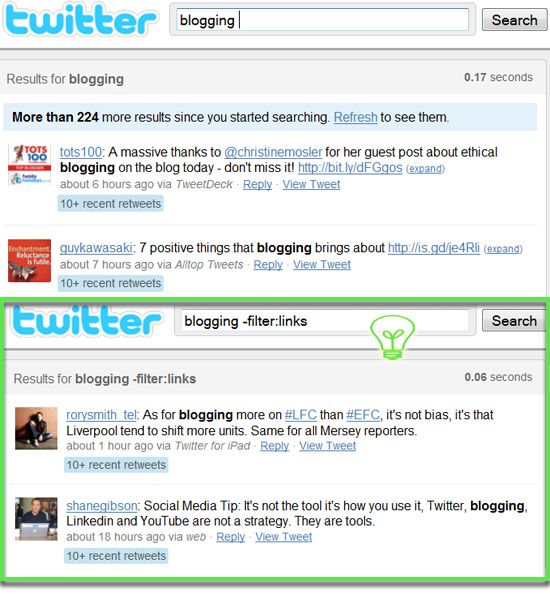
To filter out all tweets containing links, you need to use -filter:links operator within your search query. The minus sign is crucial:

-filter:links
As you can see, it can be a handy way to find great quotes, sincere opinions, reviews and discussions.

Facebook


Background information:


Facebook advanced search
Before we get into detail, let’s make it clear what exactly we are talking about here. Facebook has three huge search platforms. We are interested in two of them:

Advanced search

The only way you can filter results is by type: People, Pages, Groups, Apps, Events, Web Results (powered by Bing), updates from friends or any update made public.
Limitations
It’s important to remember some things about Facebook search:
  • It is unpredictable. Facebook search relies heavily on your friends and friends of your friends, so you never know what other users see for your search query. It’s like Google personalized search, but with a stronger reliance on social connections over any other ranking factors.
  • It relies on exact match and lacks advanced operators (and thus flexibility). Unlike Twitter search, Facebook gives you no freedom with your query. You can’t exclude one word while including another one. You can’t filter results by location and so forth.
  • Facebook Advanced Search Operator

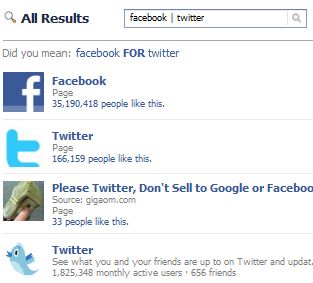
    Facebook search relies too much on exact matches. For any two words, you will only see results that contain both of your terms. But what if I want to see combined results for two words used in the query? Luckily, there’s a hidden operator. For example, twitter | facebook search will trigger results containing either “twitter” or “facebook” (or both):
    Advanced search facebook
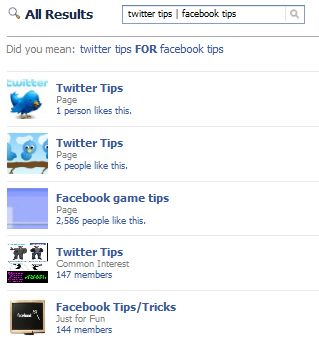
    Twitter tips | facebook tips will list either “twitter tips” or “facebook tips” (or both):
    Facebook advanced search
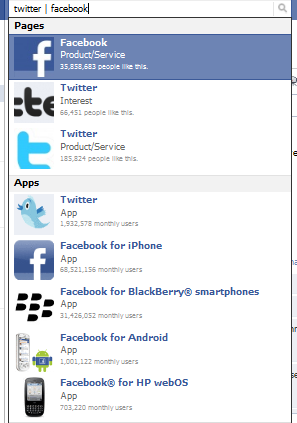
    The same operator works for the auto-complete drop-down, which means you can see much more varied results there as well:
    Facebook Advanced operator
    This supported operator gives at least some freedom in controlling your search results’ proximity and variety. Let’s hope Facebook will eventually come up with more.

    LinkedIn


    Background Information

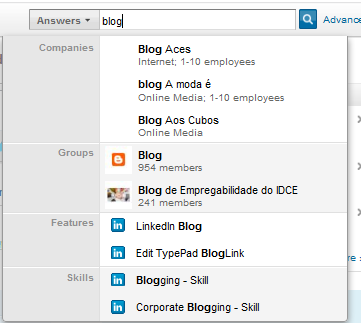
    LinkedIn has a well-developed search platform that is broken into six independent sections: People, Updates, Jobs, Companies, Answers and Groups. All of these sections offer mixed suggestions (possible results from several sections) as you type.
    Linkedin Search suggestions

    Advanced search

    Each of the above sections has a huge range of advanced search options, listed below:
    • People: Filter results by location, relationship, (past) industry and school. More options are available for premium members.
    • Updates: Filter results by your connection level, see updates from your immediate network, from friends of your friends or your third-level network, as well as set the time range, location, etc.
    • Jobs: Filter results by how fresh they are, experience required, industry, etc.
    • Companies: Filter results by location, industry, relation, company size, fortune, etc.
    • Answers: Filter by categories. You can add multiple categories.
    • Groups: Filter by category and language.
    With such a variety of options, you are unlikely to ever need any more of them. However, there are some really handy Boolean operators, which can make search even more efficient.

    LinkedIn Search Boolean Operators

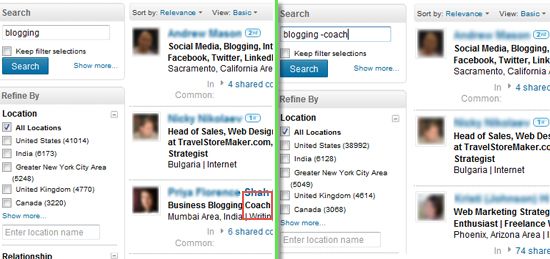
    Exclude any term while staying within your topic. For example: blogging -coach. Compare the results below:
    Linkedin - exclude any word from search results
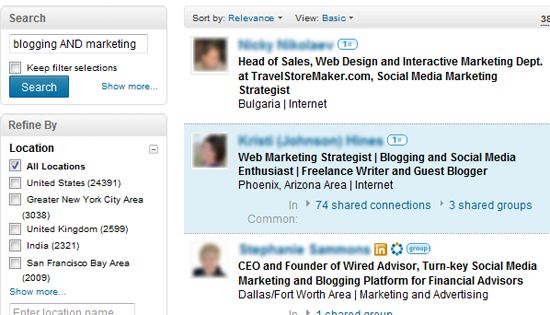
    Combine two search terms within one search if you, for example, want to find people who mention both “blogging” and “marketing” in their profiles:
    Combine search terms - Linkedin
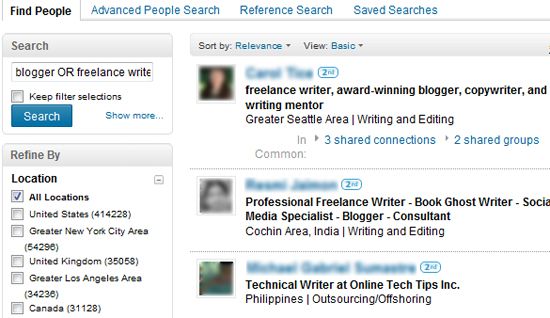
    Choose to see at least one of your terms within search results. This one is similar to Facebook’s operator mentioned above. For instance, search for blogger OR freelance writer:
    LinkedIn search: OR operator

    Final Word


    I hope these “hidden” social search operators will open up new exciting opportunities for you and will inspire you to get more creative with searching Twitter, Facebook and LinkedIn. Please share your own secret search tricks in the comments below. (Source )

The 10 most Mac-friendly countries on the planet


Have you ever wondered where in the world Macs are the most popular? We have, so we decided to find out.
To do this, we examined OS market share numbers from across the world to identify the countries where Mac OS X has the highest market share.
You’d expect the United States, Apple’s home market, to lead the pack, but it’s not quite that simple.

The most Mac-friendly countries

We looked at desktop OS market share data from StatCounter, which is based on visitor stats from more than three million websites. To get up-to-date numbers, we focused on the month of February, 2011.
Doing this, we ended up with the following top 10 countries in terms of Mac market share: Switzerland, Luxembourg, the United States, Iceland, Canada, Australia, New Zealand, Norway, Denmark and Singapore.
Top 10 Mac countries
Above: Top Mac countries based on the OS market share in each country.
Just outside the top 10 you find countries like Sweden, Japan, the United Kingdom, France, Belgium and Finland.

The most Mac-friendly world regions

Now that we’ve looked at the Mac market share in individual countries, what about the market share in the different world regions?
Here it turns out that the United States makes a comeback. North America comes in at number one, closely followed by Oceania, then Europe as a distant third. The Mac has less than 2% market share in Asia, Africa and South America.
Mac market share by world region
Above: Top Mac regions based on the OS market share in each country.
Another observation we’d like to add is that, as a subregion of Europe, Apple has made a very good impression in the Nordic countries. Three of the top 10 countries are Nordic, and all five Nordic countries are included in the top 20.

Conclusion

With the massive success of Apple products like the iPod, iPhone, and lately, the iPad, it’s sometimes easy to forget that Apple also sells personal computers. Apple’s Mac computers have never dominated the market in the same way, always being a distant second to Windows-based PCs, but they do sell well, and have become increasingly popular lately.
Now, after this post, you know where Apple has been most successful in building its Mac user base.
(Source )

 
Design by Wordpress Theme | Bloggerized by Free Blogger Templates | free samples without surveys